

About us
MoldoWEB is a software development company, located in Romania, specialized in providing outsourcing and team augmentation services for clients around the world.
Table of contents
- The Shift to Signal-Based Forms
- Core Concepts of Angular Signal Forms
- Setting Up Your First Signal Form
- Built-in Validation and State Management
- Why Prefer Signals to Traditional Reactive Forms?
- Conclusion
Angular has kept evolving to cope with contemporary needs of software developers. The latest Angular update called Angular Signal Forms is a significant step toward handling complicated forms in an efficient manner. Historically, form management was considered quite a challenging topic, but with the help of the new Signal API, the problem of managing states has become easier to deal with due to getting rid of complex abstractions and going for reactivity.
This article is focused on explaining how Signal Forms help developers synchronize application models and the UI via native Angular Signals. We are going to discuss the significance of the innovative technology and understand why this feature makes Angular development even more effective when compared to such approaches as reactive or template-driven forms.
The implementation of form management without the use of RxJS subscriptions for simple inputs, combined with the binding of components with the new directive [formField], helps achieve better performance and create scalable web applications. Understanding how to utilize signals in Angular will help avoid boilerplate code and make your project much cleaner and easier-to-manage.
The Shift to Signal-Based Forms
Let's be honest: building and managing complex, enterprise-grade forms in Angular has traditionally been a heavy lift. If you have spent any time developing web applications, you have likely experienced the frustration of wrestling with dense FormBuilder configurations, hunting down memory leaks from lingering valueChanges subscriptions, or debugging deeply nested ControlValueAccessor implementations. Even with the welcome addition of Angular typed forms in version 14, state management remained fundamentally tied to heavy RxJS observables.
That all changes with Angular Signal Forms.
By leveraging native Angular signals, this new API completely strips away the heavyweight abstractions of traditional reactive and template-driven forms. Instead of juggling complex observable streams just to capture basic user input, Signal Forms allow you to synchronize your application models and the UI with zero RxJS overhead. This highly declarative approach perfectly complements standalone components, reduces boilerplate, and optimizes your application for the blazing-fast future of zoneless change detection.
Core Concepts of Angular Signal Forms
For you to fully appreciate how fresh this innovation is, all you need to know about are only three essential elements:
Model Signal (signal<T>): The form's source of data is simply an Angular signal that holds your data interface.
Form Factory (form()): A function that accepts the model signal and creates a "FieldTree," which resembles the structure of your data and gives you access to fields using dot notation.
Binding Directive ([formField]): The connector from the input field in your HTML to the "FieldTree". There is two-way synchronization without using the typical formControlName.
Whenever the user types anything in an input associated with [formField], the signal changes, and whenever the signal changes, the input changes too.
Setting Up Your First Signal Form
Let’s look at what this actually looks like in practice. Notice how clean the component stays, and how naturally the native @if and @for control flow blocks handle our error states in the template.
Enterprise applications have been used to working through heavy-formBuilder logic and plenty of boilerplate code just to gather the most fundamental user input. The introduction of Signal Forms is a paradigm change, providing a highly declarative approach that does away with all the extra work. Let's examine the implementation process for a Signal Form step by step to get a feel of how this new technology can make you think more in terms of component state rather than form configuration.
Defining Your Source of Truth
Let's begin where you should start all of your application's development processes, by defining data. In this case, you don't need to wrap your properties within control classes; instead, you declare a regular Angular signal to serve as your source of truth. You define precisely the data shape you wish to capture via a plain-old TypeScript interface. By doing so, you introduce yet another layer of consistency into your project since you now define your form state exactly like any other local component state.
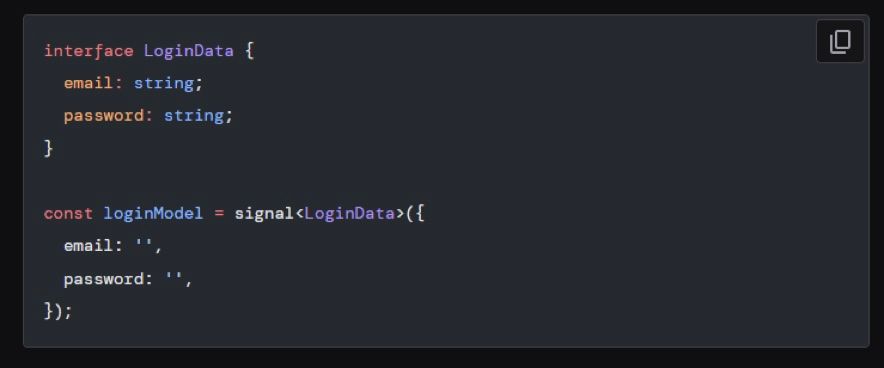
Generating the Field Tree Once your model is defined, Angular provides the form() function. By passing your model signal into this function, Angular generates what it calls a "FieldTree." Think of this tree as a reactive mirror of your data model. It creates an object structure that maps perfectly to your interface, allowing you to access, read, and attach validation to individual fields using standard dot notation.
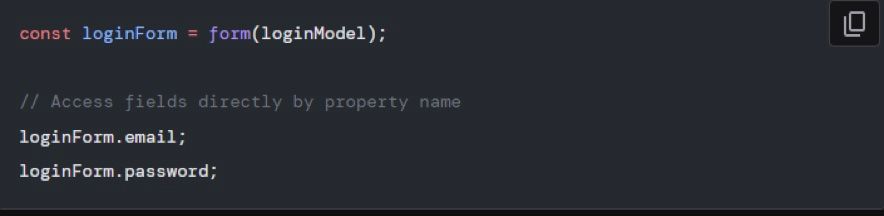
Binding It All Together The final step takes place in your template. You bind your native HTML inputs directly to the FieldTree using the new [formField] directive. This directive serves as a modern replacement for the traditional formControlName syntax, establishing a seamless, two-way synchronization between your HTML input and your underlying signal model.

With just those few intuitive lines, your form becomes fully reactive. When a user types into the input, the signal updates automatically. If you programmatically update the signal after fetching data from a backend service, the input reflects the change instantly, completely removing the need for imperative methods like patchValue().
Built-in Validation and State Management
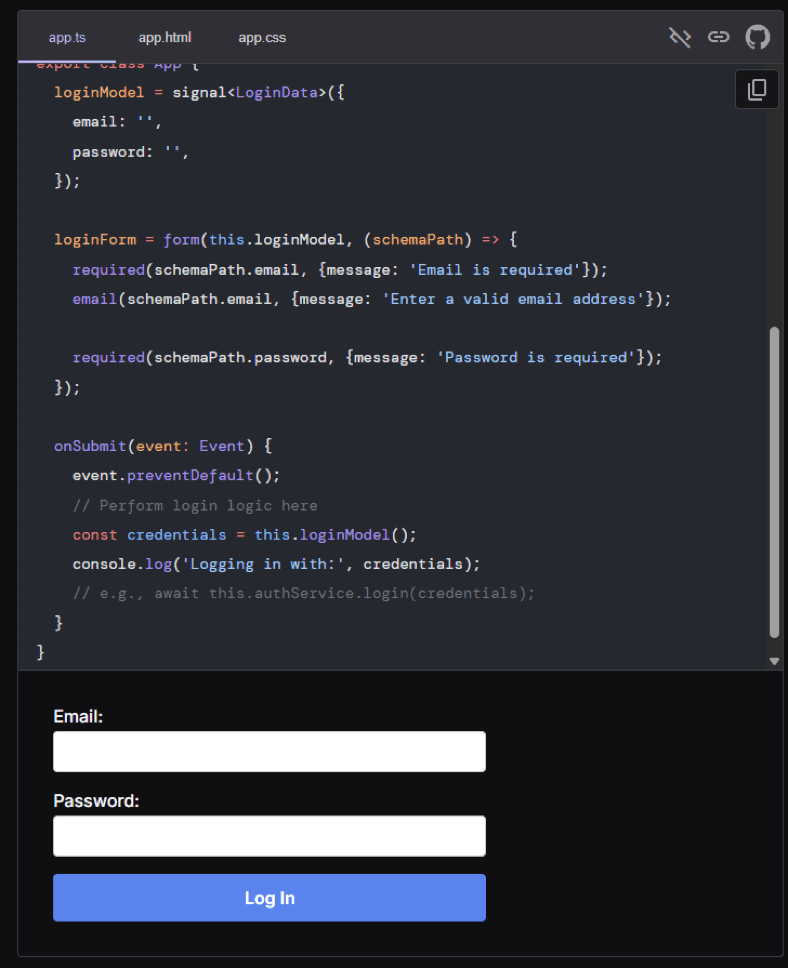
Take a careful look at the form() initialization in the code above, and you will see how validation works now. There is no longer an array of validators passed into a FormControl constructor; instead, a schema function is passed to form() as its second argument.
This schema points to your fields. You simply use your favorite validators such as required(), email(), min(), and pattern() on the relevant paths. Custom error messages can be easily passed using the options object.
To check the field's state becomes incredibly simple, too. Any field has exposed state signals:
valid() // Did it pass validation?

touched() // Has the user focused and blurred the field?

dirty() // Has the value been changed?

errors() // What went wrong? (Returns an array of errors with kind and message).
No more this.myForm.get('email')?.touched null-checking gymnastics. You just call profileForm.emailAddress().touched() and get your definitive answer.
Why Prefer Signals to Traditional Reactive Forms?
When you are building a new feature or a new application from scratch, you should definitely give signals some serious thought. Why?
1. Faultless Performance: By getting rid of RxJS and being fully compliant with Angular’s move toward zoneless change detection (ChangeDetectionStrategy.OnPush), Signal Forms minimize CPU usage and memory consumption. Update cycles have been optimized to perfection.
2. Reduced Boilerplate Code: With the signals approach, there is no need to manage two different sets of data (your FormGroup and your own data model interface). Your signal becomes your data.
3. Synchorous Access: Want to see what the current form value looks like? Just read your signal - this.userModel(). No need for subscriptions or any other RxJS nonsense to get access to a mere string.
4. Type Safety at its Best: Since the field tree matches your signal<T> type interface exactly, your IDE catches all typos instantly. Change your property names in the interface and the compiler will tell you where.
Conclusion
Angular Signals Forms are not only syntactically different from traditional reactive forms. It is rather an entirely new approach to handling user input that helps us keep our components smaller, our templates cleaner, and our state predictable.
Although the API may seem rather immature at the time of writing, the fact that it fits perfectly into the larger picture of the future Angular ecosystem should make us appreciate it. Give it a shot in your next component implementation and you will be surprised!